
Claude plugins now work in the web app, and for teams they matter more than skills. A plugin packages skills, MCP connectors, commands and agents into one unit you install once, so a team can share, version and update a whole workflow instead of each person maintaining their own skills. Use a skill for a personal, repeatable task; use a plugin when a team needs the same workflow and the connectors it depends on.
Plugins bring skills and connectors together
If you've been using Claude for a while, you've probably used skills. At its simplest level, Claude can produce prompts (SKILL.md) that allow it to use the same set of instructions for repeated workflows. The best part: Claude can decide when to use them, not just the user. At higher levels of complexity, skills can manage multiple processes and workflows. These complex skills (just .zip files with some requirements and a modified .skill extension) package together folders and layers of resources, with 'progressive disclosure' allowing Claude to discover and utilize a number of different workflows at once. Skills like this are great, but they have a couple of key problems:
Skills have to be edited manually by the user or recreated entirely from scratch by Claude. That makes maintenance and enhancements a total pain.
The skills exist independently of related MCP connectors, so users have to reference connectors directly in the skill instead of natively including an allowed or suggested list.
Skills have no version control or binding to GitHub, which means there's no easy way for a large team or organization with many different contributors to maintain them.
Plugins solve those problems
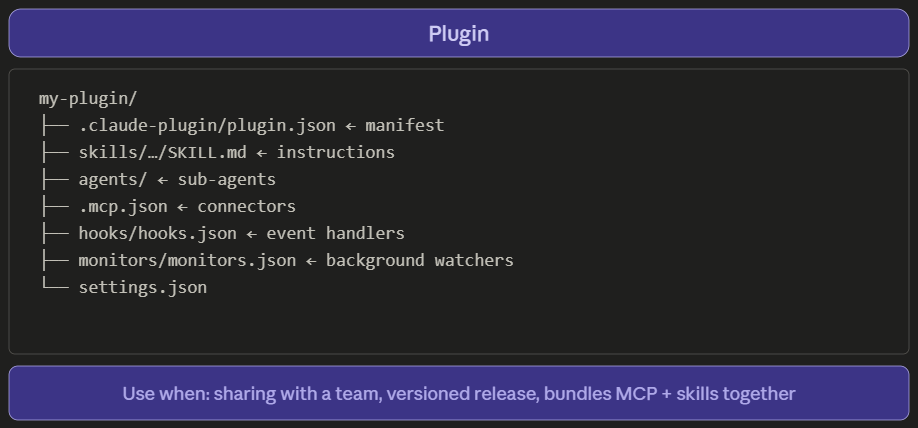
Plugins are packages made to be maintained remotely and installed by users. They bundle everything a workflow needs — instructions, MCP connections, agents, hooks, background monitors, settings — into a single deployable package. You add it once. It works everywhere it's supposed to.
The difference matters more than it sounds. Skills are great for personal workflows and repeatable tasks you've built yourself. Plugins are built to be shared, versioned, and maintained. That's a meaningful shift for teams and for anyone who wants to use AI tooling that keeps up with how their business actually operates.
Anthropic and their partners have produced a number of plugins for Claude, with some of the most popular being those for Legal and for Small Business, both of which I've found useful in my work. You can also build your own plugins, and they can be maintained the same way. Keep a plugin in a GitHub repository, add that repository as a marketplace, and updates flow from the source. On Team and Enterprise plans, an organization owner can sync the company's plugins from a private GitHub repository and make them available, installed by default, or required for members. That makes plugins the way to securely and easily maintain an organization's workflows and processes.
If you want to try it today, Claude has its own workflow on the web to help you build one. Go to Customize > Plugins > Add > Create with Claude. Custom plugins offer a way for teams across industries — marketing, finance, consulting, legal, and more — to combine the value of skills and connectors into more easily-managed packages.
If you want to talk through what a plugin could do for your team, let's chat!
Mosaic Solutions helps small and mid-sized businesses implement AI that actually works. mosaicsolutions.tech